
How to Invite a Friend to join MeetMeWorld.net
From your profile toolbar select friends.

The Friends page lists your current friends and shows the Friend Request you sent, and Friend Request Pending your approval.

To invite a new friend who is a member of MeetMeWorld.net enter the user name of the person in the Search friends field and click GO.
To invite a new friend from your email list click Invite Friends.
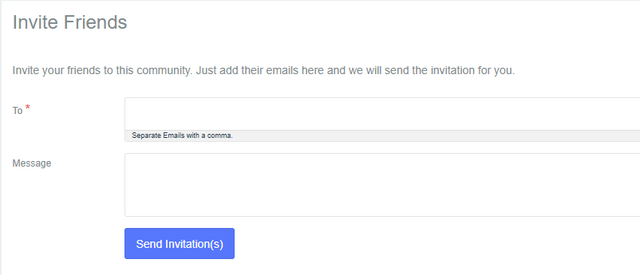
Enter the email address(es) of the friends you'd like to invite. Separate multiple email addresses with commas.
Enter a personal message for your invite. If you wish you can copy and paste the text below.
Subject: Discover MeetMeWorld.net – Where Real Connections Begin
Hey [Friend’s Name] or Friends,

I wanted to personally invite you to check out a new platform I think you'll really like — MeetMeWorld.net. It’s all about building authentic connections, staying in the loop with real news, and engaging with a community that actually values meaningful interaction.
It’s not just another social site — it’s a space where voices matter and networking feels real. Whether you're looking to make new friends, share your thoughts, or just explore something refreshingly different, I think you’ll feel right at home.
You can join for FREE by clicking the link below.
Would love to see you there and maybe even start a group together!

Cheers,
[Your Name]